Can You Use Google Pay on AliExpress?

You want to pay quickly using Google Pay, skip the card number entry, and get the order placed. But you’re not sure whether AliExpress actually supports it, or whether you’ll reach checkout and find it’s not there.

The honest answer is: it depends on your market and your device. Google Pay works on AliExpress in some countries and through the app specifically. It’s not universally available everywhere, and a few buyers get tripped up when it doesn’t appear as expected.

Here’s exactly what’s going on and what to do about it.

Quick answer

Google Pay is available on AliExpress in select markets, primarily through the AliExpress mobile app on Android devices. It works in the US, UK, and some other markets where both Google Pay and AliExpress’s payment system are available. If you don’t see Google Pay at checkout, it’s usually because you’re on the desktop website (where it may not appear), your region isn’t supported, or your device setup isn’t configured correctly. A linked card still processes the payment with AliExpress buyer protection intact.

How Google Pay works on AliExpress

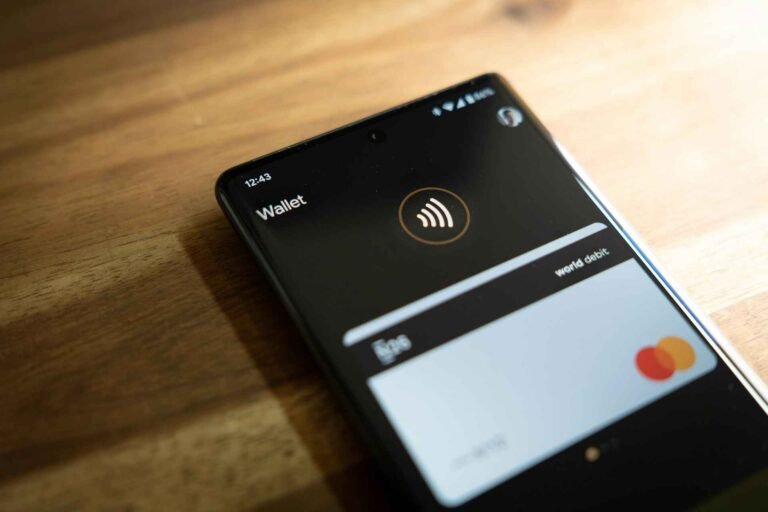
Google Pay on AliExpress functions as a wallet payment method. Rather than manually entering your card number, expiry, and CVV, you authenticate via Google Pay, which passes your stored card details to AliExpress’s payment processor.

The underlying transaction is still a card payment. Your Visa or Mastercard linked to Google Pay is what actually gets charged. Google Pay adds a layer of convenience and security: your actual card number is replaced with a tokenized version for the transaction, which means AliExpress’s payment system never receives your real card details.

This is one of the practical security advantages of using Google Pay. Tokenization means that even if AliExpress’s payment infrastructure were somehow compromised, your actual card number wouldn’t be exposed.

From a buyer protection standpoint, nothing changes. AliExpress buyer protection applies regardless of how the payment was initiated. Your dispute rights, refund eligibility, and protection window are identical to a direct card payment.

Where Google Pay is available on AliExpress

Mobile app, not always desktop. Google Pay on AliExpress works primarily through the AliExpress Android app. The desktop website and the iOS app have different payment flows, and Google Pay may not appear there even if it works on Android.

Supported markets. US and UK buyers are the most likely to see Google Pay as a checkout option. Availability in Canada and Australia is less consistent and depends on how AliExpress has rolled out the integration in those markets at the time of your purchase.

Device requirements. Google Pay requires an Android device with the Google Pay app set up, a compatible payment card linked, and NFC or software payment capability. If your device doesn’t meet these, Google Pay won’t appear regardless of whether it’s supported in your region.

What most buyers misunderstand

The biggest confusion is assuming Google Pay works everywhere on AliExpress the way it works on, say, a domestic retailer’s app. It doesn’t. AliExpress’s payment integration with Google Pay is more limited than, for example, its Visa and Mastercard direct integration.

The second misunderstanding is that not seeing Google Pay means you can’t use the linked card. You can. If Google Pay isn’t appearing, you can manually enter the card details linked to your Google Pay wallet. You lose the convenience and tokenization benefit, but the underlying payment works fine.

The third: some buyers try Google Pay on the AliExpress desktop website and are surprised when it doesn’t appear. AliExpress’s desktop checkout has historically had a different payment option set than the mobile app. If you’re on desktop and want Google Pay, try switching to the Android app.

Check These Out -  AliExpress Refund Policy Explained in Simple Terms

How risky is using Google Pay on AliExpress, really?

Lower risk than direct card entry in one specific sense: tokenization. When Google Pay processes a transaction, a unique token is generated for that transaction rather than passing your real card number. This means your card details have less exposure.

Beyond that, the risk profile is identical to any other card payment on AliExpress. You’re covered by AliExpress buyer protection. If a dispute arises and AliExpress doesn’t resolve it, you still have credit card chargeback rights through the underlying card linked to Google Pay.

The practical risks with Google Pay specifically are minor: the payment declining because Google Pay isn’t set up correctly on your device, or the option not appearing at checkout because of regional availability. Both are fixable rather than fundamental problems.

Country-by-country: Google Pay on AliExpress where you are

United States

US buyers on Android have the best chance of seeing Google Pay at AliExpress checkout. The US is one of the more developed markets for the integration. Open the AliExpress app, go to checkout, and Google Pay should appear in the payment options if your Google Pay is set up with a valid linked card.

For US buyers, the fee picture is the same as direct card payment. If the card linked to Google Pay has a foreign transaction fee, that fee still applies. Google Pay doesn’t change the card’s fee structure. If you want to avoid foreign transaction fees, link a no-fee card to Google Pay rather than a standard bank debit card.

Credit card chargeback rights apply to Google Pay transactions in the US exactly as they do to direct card payments. The underlying card network (Visa, Mastercard) provides the same protection regardless of whether the charge came through Google Pay or a direct card entry.

Shop Now On AliExpress

United Kingdom

UK buyers using the AliExpress Android app should see Google Pay as a checkout option. The UK is one of AliExpress’s more developed markets for mobile payment integration.

The same currency consideration applies as with direct card payment. If you’re paying in GBP, the transaction is in your local currency and your linked card (assuming it’s a GBP account) processes without conversion. Google Pay doesn’t change this dynamic.

UK buyers should note that Google Pay is a debit or credit card wallet, not an independent financial product. Section 75 protection applies if the underlying card is a credit card charged over £100. Chargeback rights apply regardless of the charge amount. These protections work through the linked card, not through Google Pay itself.

Shop Now On AliExpress

Canada

Google Pay availability on AliExpress in Canada is less consistent than in the US or UK. Some Canadian buyers see it in the app; others don’t. This reflects AliExpress’s regional rollout rather than a problem with your device or account.

If Google Pay doesn’t appear for Canadian buyers, the straightforward fallback is entering your card details directly. If you’re using Revolut, Wise, or a no-foreign-fee Canadian card linked to Google Pay and it doesn’t appear at checkout, manually entering that card’s details achieves the same outcome.

Canadian Google Pay transactions on AliExpress carry the same brokerage fee considerations for express courier shipments as any other payment method. The payment method doesn’t affect customs or duty outcomes.

Check These Out -  Why Is AliExpress So Cheap? Is It Too Good to Be True?

Shop Now On AliExpress

Australia

Google Pay availability in Australia on AliExpress varies. The integration is less consistently available than in the US or UK. Australian buyers may or may not see it at checkout depending on AliExpress’s current rollout status.

If it’s available and you use it, the same considerations apply: no foreign transaction fee if your linked card doesn’t charge one (28 Degrees Mastercard and ING Orange Everyday linked to Google Pay work well here), and buyer protection identical to direct card payment.

For Australian buyers where Google Pay isn’t appearing, the Android app is the best place to check. If it’s still not there, direct card entry is the fallback.

Shop Now On AliExpress

What to do: getting Google Pay working on AliExpress

  1. Download or update the AliExpress app on your Android device. Google Pay integration lives in the app. Make sure you’re running the current version.
  2. Make sure Google Pay is set up on your device with at least one active card. Open Google Pay, confirm your card is linked and the card details are current and verified.
  3. Add the card you want to use as your default payment method in Google Pay. AliExpress typically charges the Google Pay default card. Make sure the right card is set as default before checkout.
  4. At AliExpress checkout, look for “Google Pay” in the payment options. It typically appears alongside Visa, Mastercard, and PayPal if it’s available in your market. If you don’t see it, proceed to step 5.
  5. If Google Pay isn’t showing, try switching to the mobile app if you’re on desktop. The desktop website often doesn’t show Google Pay even when the app does.
  6. If it still doesn’t appear, enter your card details manually. The card linked to your Google Pay account is a real card with real details. Use those details at checkout directly. You lose the tokenization convenience but the payment works identically.
  7. After payment, verify the charge appeared in both AliExpress “My Orders” and your Google Pay transaction history. Confirm the amounts match and your protection window is active.

Tips for Google Pay users shopping on AliExpress

Link a no-foreign-fee card to Google Pay for AliExpress purchases. The foreign transaction fee question is about the underlying card, not Google Pay itself. If you link Revolut, Wise, or a travel card with no foreign transaction fee to your Google Pay, those fee advantages carry through to your AliExpress purchases.

Use Google Pay for the tokenization benefit on a platform with many sellers. AliExpress has thousands of sellers. Even though your card details go to Alibaba’s payment system (not individual sellers), using Google Pay adds a tokenization layer that keeps your real card number out of the transaction record. It’s a minor but real security improvement.

Don’t assume Google Pay works on AliExpress desktop. Many buyers try to use it on desktop and are confused when it doesn’t appear. Always check the Android app for Google Pay availability first.

If your Google Pay payment declines, check for a verification prompt in the Google Pay app. Some first-time transactions trigger a verification step. Check the app, verify, and retry rather than immediately switching to a different payment method.

For disputes, know that your chargeback rights run through the underlying card, not Google Pay. If you need to file a chargeback after a failed AliExpress dispute, contact your card issuer (the bank that issued the card linked to Google Pay), not Google. Google Pay is the delivery mechanism; the card issuer holds the dispute rights.

Check These Out -  Can You Get Scammed on AliExpress? How Buyers Actually Get Scammed

Consider using a dedicated virtual card in Revolut linked to Google Pay for AliExpress. You can create a Revolut virtual card, link it to Google Pay, and use that specifically for AliExpress. This gives you Google Pay’s tokenization, Revolut’s no-fee rate, and a card that’s easy to freeze or replace if needed.

Takeaway

Google Pay works on AliExpress, primarily through the Android app in the US and UK, with less consistent availability in Canada and Australia. It’s a convenient and slightly more secure way to pay compared to direct card entry, because of tokenization. Everything else, buyer protection, dispute rights, refund eligibility, is identical to a direct card payment.

If Google Pay doesn’t appear at checkout, the fallback is simple: enter your card details manually. The underlying card works exactly the same way. You lose the convenience but not the protection.

For buyers who care about both security and fee efficiency, the optimal setup is a no-foreign-fee card (Revolut, Wise, or a travel card depending on your market) linked to Google Pay, used through the AliExpress Android app. That combination gives you speed, tokenization, competitive exchange rates, and zero bank fees on every AliExpress purchase.

FAQ

Does Google Pay work on AliExpress? Yes, in supported markets through the AliExpress Android app. The US and UK have the most consistent availability. Canada and Australia have more variable support. The desktop website often doesn’t show Google Pay even when the app does.

Why isn’t Google Pay showing at AliExpress checkout? The most common reasons: you’re on the desktop website rather than the Android app, your region isn’t fully supported, your Google Pay setup has an issue (expired card, verification needed), or AliExpress hasn’t rolled out the integration in your specific market yet.

Does using Google Pay on AliExpress change my buyer protection? No. AliExpress buyer protection applies regardless of payment method. Dispute rights, refund eligibility, and protection window are identical whether you pay via Google Pay, direct card, or PayPal.

Are there any extra fees for using Google Pay on AliExpress? Google Pay itself charges no fees. The foreign transaction fee question depends on the underlying card linked to Google Pay. If that card charges a foreign transaction fee, it still applies. Link a no-fee card to avoid this.

If I need to dispute an AliExpress charge paid with Google Pay, what do I do? Open a dispute through AliExpress first, as with any payment method. If that doesn’t resolve the issue, file a chargeback through the bank that issued the card linked to your Google Pay, not through Google itself. Google Pay is the payment channel; the card issuer holds the dispute and chargeback rights.

Is Apple Pay available on AliExpress too? Apple Pay has some availability on AliExpress through the iOS app in supported markets. The same regional limitations apply as with Google Pay. If Apple Pay doesn’t appear, direct card entry is the fallback.

Can I use Google Pay on AliExpress in Canada or Australia? Availability is inconsistent in both markets. Some buyers see it; others don’t. Try the AliExpress Android app rather than the desktop site. If it’s not available, entering your card details manually achieves the same result with identical buyer protection.

Help a Friend Save Money:

Similar Posts